
API Consumer
A kind of service that allows you to take an existing Java API and expose methods in that API as services in Taverna.
Learn more about API Consumer services and how to use them in Taverna.
Beanshell
Beanshell is a Java scripting language. A Beanshell service in Taverna enables you to write simple Java code snippets and execute them as part of your workflows. Beanshells in Taverna typically perform data manipulation, parsing and formatting functions (so they are often types of shim services).
BioMart
A federated data warehouse and management system from the EBI (European Bioinformatics Institute) and the OiCR (Ontario Institute for Cancer Research). Biomart contains genomic, proteomic and any Biomart database if you provide the URL to the BioMart service interface (MartService). A BioMart service in Taverna allows you to query a BioMart database.
BioMoby
A collection of semantically described biological Web services. A BioMoby service in Taverna allows you to call a BioMoby Web service. Each BioMoby service is designed and registered to the BioMoby specification to improve interoperability between services. You can use the BioMoby annotations to discover which services consume the data types produced by other BioMoby services. BioMoby services differ from ordinary Web services in that these services consume and produce BioMoby objects, so in order to use a BioMoby service, you have to first define your data as a BioMoby object.
BioMoby object
BioMOBY objects represent valid data structures consumed and generated by BioMOBY services. Objects are serialised into XML as defined by the BioMOBY Object Ontology and add semantics layer to BioMoby Web services, despite not using the RDF or OWL standards.
Command Line Tool
Taverna Command Line Tool is a command line script that enables a quick execution of workflows from a terminal without the overheads of a GUI. It receives the workflow to execute and inputs as command line parameters and writes the outputs to a folder on a disk.
Control layer
Taverna adds a control layer to every service in a workflow to provide users with more control over how a service is being invoked. This layer enables users to add a loop around a service in order to invoke it several times, until a certain condition is met. It also allows user to define how a service should handle incoming list items where two or more lists are being passed to the service on two or more different ports. In future, it will also include defining an alternate service of similar/equivalent functionality to replace the original one in a case of failure.
Control link
Enables you to set dependencies between services in a workflow that do not directly share data (i.e. that are not otherwise linked by passing data from one to the other directly or indirectly). A control link allows you to delay the invocation of a service until another has finished.
Configuring services
All services in Taverna allow for some kind of configuration. Configuring String constants is very simple and requires only setting the constant value. WSDL services only require configuring if they are secure, e.g. to specify authentication type they require. Other services, such as BioMart and Beanshells, require their input and output ports to be configured by the workflow designer after they are imported into a workflow. In the case of BioMart, inputs and outputs are determined by selecting database a query and filtering options from a configuration UI. For Beanshells, the script itself and the names of the input and output ports must be set in the configuration UI.
There is another level of service configuration that is the same for all services that deals with how the control layer around the service will execute in Taverna. These configurations can be used to specify whether users wants a service to be invoked several times in a loop, how they want the service to handle incoming lists of data, etc.
Credential Manager
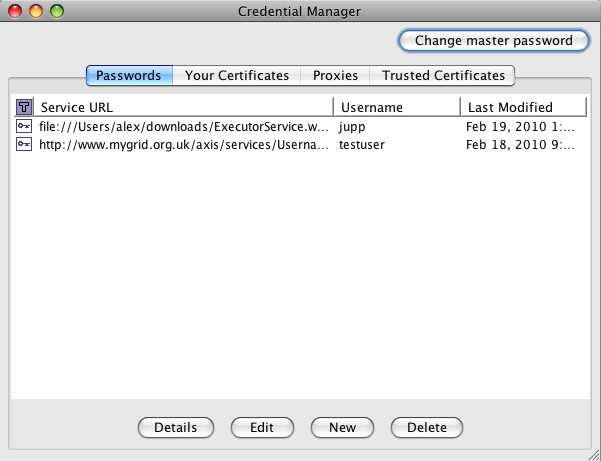
Credential Manager is a utility that manages your credentials, i.e. stores your usernames and passwords and private key certificates securely on the hard drive (as of Taverna 2.1). It also remembers what credentials you want to use for which services. This is convenient, as you do not have to enter your security details every time you invoke a service from a workflow that requires you to authenticate. In this respect, Credential Manager is similar to Password Manager in Firefox or Internet Explorer, or Keychain (Apple’s password management system in Mac OS).
Credential Manager also keeps certificates from trusted services and trusted CAs (that issue certificates to services). This is so that Taverna can open HTTPS connections to a desired secure service when executing a workflow, similar to browsers and Java (see also the question about HTTPS). The first time you start the Taverna Workbench 2.x – it will attempt to copy certificates of all trusted CAs that come bundled with Java. If you have played with these settings in Java and changed the default password for Java’s truststore – Taverna will ask you to enter that password so it can perform the copying. If you have not – Taverna will not bug you and will perform the task silently.
Cross product
Cross product is the term we use to describe a case in list handling where elements of 2 lists (of arbitrary depth) are being passed to two input ports of a service where at least one expects a list of lower depth than it receives. Say, we have an input ports port1 and port2 that expect single values but you pass them lists [a1, a2, a3] and [b1, b2, b3] respectively. If you specify the cross product as list handling type, the service will be invoked nine times where each element of the first list will be combined with each element of the second. In other words, inputs per iteration will look as follows:
| Iteration Port | 1 | 2 | 3 | 4 | 5 | 6 | 7 | 8 | 9 |
| port1 | a1 | a1 | a1 | a2 | a2 | a2 | a3 | a3 | a3 |
| port2 | b1 | b2 | b3 | b1 | b2 | b3 | b1 | b2 | b3 |
Basically, in cross product each element from the first list is combined with each element in the second list. Also see dot product.
Note that if you have three or more inputs as described above – you can use any combination of cross and dot products but you need to be careful of the order in which you apply them.
If Taverna needs to apply implicit iteration and you have not specified how you want input lists to be handled, then the configuration defaults to cross product.
Data link
Enables the results (an output) from one service to be sent as the input of another.
Depth of ports
Input and output ports of services may consume or produce single string values, lists, lists of lists, and so on. Therefore, as well as understanding the type of data that you are handling, you need to consider where this will appear in an output (for consumption by the next service in a workflow). A single value is considered to be of depth 0. A list of values is depth 1. A list of lists is depth 2, and so on.
Details View
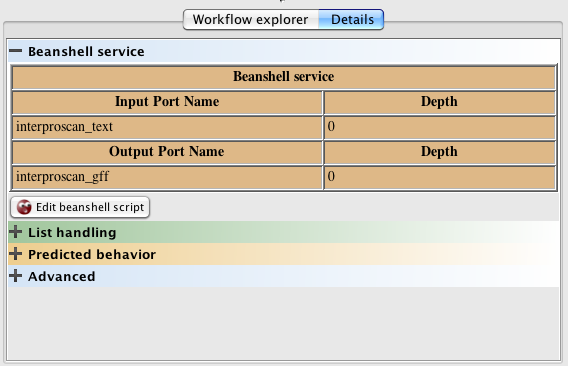
Details View is one of the tabs on the Workflow Explorer panel in the bottom left corner of the Workbench. It contains context-dependent details about the currently selected workflow item (e.g. a service or a port) and lets you configure it, if configuration for that item is available. Configuration of the item is also context-dependent. For example, for a Web service, it enables you to configure its security requirements. For a Beanshell service, it lets you configure its script and input and output ports.
In addition, there are advanced configuration options. For services, these include setting list handling, checking predicted behaviour and configuring service looping. For ports, these include checking predicted behaviour and adding/editing annotations.
Dot product
Dot product is the term we use to describe a case in list handling where elements of 2 lists (of arbitrary depth) are being passed to two input ports of a service where at least one expects a list of lower depth than it receives. Say, we have an input ports port1 and port2 that expect single values but you pass them lists [a1, a2, a3] and [b1, b2, b3] respectively. If you specify the dot product as list handling type, the service will be invoked three times:
- in the first one input port1 will get value a1 and input port2 will get value b1.
- in the second one input port1 will get value a2 and input port2 will get value b2.
- in the fist one input port1 will get value a3 and input port2 will get value b3.
Basically, in dot product elements at the same position in the list are combined – nth element of the first list will be send as an input together with the nth element of the second list. Also see cross product.
Note that if you have three or more inputs as described above – you can use any combination of dot and cross products but you need to be careful of the order in which you apply them.
List handling
List handling is a special control feature of Taverna that enables services that take, say, a single input value on a certain port to receive a list of that port without user having to worry about this “incompatibility”. Taverna will implicitly extract the single values and iterate over the list. More generally, if a service takes a list of depth n as an input and you pass it a list of depth n + m, Taverna’s list handling control will extract the innermost depth n lists and pass them to the service iterating over the n + m dimensional structure.
List handling control works the other way around, too. If your service expects an input of depth n, and you pass it an input of lower depth – Taverna will wrap the input into a list of correct depth. For example, a service expects a list and you pass if a single value called val, Taverna will wrap the single value and pass it as a list [val]. If a service expects a list of lists (i.e. a list of depth 2), Taverna will wrap the input value as [[val]].
This feature is also known as implicit iteration. It is more general than just control settings on a service – it applies to the whole workflow. If you supply a workflow with multiple items of data, Taverna will automatically take each piece of data in succession and feed it through the workflow. As results are produced, Taverna will also pass those results through the workflow if the next service also accepts individual values. This enables data streaming. If two or more streams of data are to be combined on two ports of a service (e.g. a service port expects a list rather than individual value), the default behaviour of Taverna is to combine them in an all against all fashion (see cross product). If you want to change this, you must change the list handling settings.
Taverna’s list handling feature enables you to define how inputs will be handled (combined) in cases where you do not pass the input of an expected depth to an input port. In such cases, users have an option to combine the input lists using the dot product or the cross product option. You can see a visual representation of what happens here.
Local services
A Beanshell that is part of the Taverna distribution and helps with gluing services together. Local services (previously known as local workers) are a collection of data manipulation and formatting services (also known as shims).
Merge
If the input for a particular service is to be combined from more than one upstream service, these inputs can be combined in a special merge operation. This allows you to feed the merged data in to the next service. Merges appear in the Workflow Diagram as circles, whereas services appear as rectangles. Taverna creates merges automatically if you create more than one data link to the same service input port or workflow output port.
Nested workflow
A workflow within a workflow. In an abstract sense, a nested workflow is just another kind of service that can be added into a workflow, except that instead of it being a black box, it is a white box so you can see what is happening inside. It is often the case that a workflow designed for one purpose can be used again for other experiments and can be imported and added to another workflow. Nested workflows can be added to a workflow by dragging the nested workflow service description into the Workflow Diagram.
Port
In Taverna, a port is a connector, from an input or output of a service. Typically, an input port is either a data input or an input parameter setting. In a Web form, this would be equivalent to text boxes and configuration settings, and on a command line, this would be equivalent to parameter settings (flags). Output ports are the same. They allow you to pass the results of one service to others.
Provenance
Provenance is a history or a trace of (in this case) a workflow run. Workflow provenance data allows you to find out which workflows have been executed, with what data, and what the intermediate and final results were. It allows you to compare results between workflow runs and to confirm that all services have completed successfully during a run. It is also useful for debugging the design and development of your workflow.
Renderer
Taverna can display the results of a workflow in many different formats. As well as the standard formats (e.g. HTML, Text, XML etc), Taverna can display data using specialist formats. A renderer is a plugin that controls how to display data in these specialist formats. For example, Taverna can display 3D Jmol images of protein structures, images and XML trees.
REST
REST stands for REpresentational State Transfer. REST services are type of Web services that typically expose some of the following four types of operations:
- GET – to get a resource
- POST – to make a new resource
- PUT – to update a resource
- DELETE – to delete a resource
Rshell
A service that enables analyses using the R statistical package to be incorporated into the workflow.
Service
An instance of a service description within a workflow. The service instance may need to be configured before it can correctly call the corresponding service. A configured service does what it is configured to do for that particular run of the workflow.
Service in a workflow can also define the control layer around it, e.g. how the service handles lists and service looping.
Service description
A reusable way of defining a particular service. A service description allows a particular service that it describes to be added and consumed in workflows. Currently, there are service descriptions for Web services (WSDL), BioMart, BioMoby, Soaplab, Rshell scripts, Beanshell scripts, API Consumer, Nested workflows, Spreadsheet import and String constant services.
Service descriptions are added to Taverna by using various service providers, by clicking Import new services in the Service Panel. Service providers return an individual service description or a set of service descriptions that match a particular search query. The returned service descriptions will appear in the Service Panel. Top-level folders in the Service Panel tree represent service providers that were used to add a particular service or set of services. Nodes in the Service Panel tree represent the actual service descriptions that can be dragged into the workflow diagram to create service instances and include them in a workflow. When a service instance is added to a workflow, it is simply called a service.
It is common for services to do more than one thing, so, in their unconfigured state, a service may have multiple potential uses. Configuration of a service in a workflow is done by clicking Configure in the service’s Details View or right-clicking the service in a diagram and selecting the Configure option from the pop-up menu. Configuring a service is optional – they would still run unconfigured using the default settings that come with the service description.
There are two special service description types: Service templates and Local services. They can be found at the top of the Service Panel tree. Service templates include service descriptions for services that always must be configured prior to running. These are Beanshell, Rshell, String constant, Spreadsheet import and Nested workflow services. Local services include preconfigured Beanshell descriptions that provide various useful and commonly used services, such as data, text and file manipulation. Once dragged into a diagram, Local services can be further configured by the user to modify their original functionality.
Service Panel
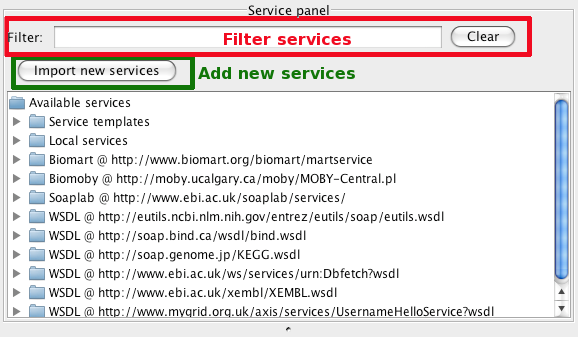
Service Panel, in the top left corner of the Workbench, contains the available services that can be used in workflows. You can narrow down the available services through the “filter” text field at the top of the panel. It will filter the available services using the search term in all fields available for the services. For example, for a Web service, it will check for the search term in the service WSDL URL, operation names and the service description.
From the Service Panel you can also add new services by clicking the Import new services button. A dialog will pop up asking you to select which service type you want to add (e.g. a BioMart or WSDL service).
Service provider
A service provider in Taverna is used to search for and/or add service descriptions of a particular type. For example, a BioMoby service provider will bring up all available BioMoby service descriptions into Taverna’s Service Panel from a BioMoby registry that you specify in the BioMoby service provider UI. WSDL service provider will add all methods (functions) that are available from a Web service which WSDL URL you specify in the WSDL service provider UI.
Service looping
In Taverna, service can be configured to be invoked repeatedly for a certain number of times or until some logical condition is met.
Service template
Service template includes a description of a service that cannot just be simply run “out of the box” when drag-and-dropped into a workflow but must be configured prior to running. Service templates are Beanshells, Rshells, String constants, Spreadsheet imports and Nested workflows.
Scientific (domain) service
A service that performs analysis on data or sets of data.
Shim service
A service that does not perform a scientific function, but acts to ‘glue’ services together that otherwise have incompatible outputs/inputs. Shim services typically perform data manipulation, formatting, parsing or database mapping functions.
Soaplab
A tool for wrapping command-line and legacy programs automatically as Web services. Soaplab is particularly designed for people who prefer to program in perl or python. The services that Soaplab produces are a kind of Web services, but they are slightly different in that: 1) the service provider can add more descriptions of how the service works, and 2) the service can be statefull (i.e. an analysis is submitted to a Soaplab service and it produces an identifier. Taverna can then keep checking this identifier for the status and for completion of the job). Soaplab services can be included in Taverna workflows.
Spreadsheet import service
A service that allows you to import Excel or csv spreadsheets and feed the content into your workflow. To import a spreadsheet into your workflow, simply add the SpreadsheetImport service to your workflow (either drag it from the Service Panel into the Workflow Diagram or Explorer, or right-click on it in the Service Panel and select Add to workflow).
When you add the service to your workflow, you can configure how it deals with the rows and columns from the spreadsheet:
• select which rows and columns to output
• how to deal with empty cells
• whether to include the header row, and
• what name to use for the data from a given column
A SpreadsheetImport service takes as input the file path or URL to an Excel spreadsheet. It has an output port for each selected column; data for the selected rows of the column is output from the port in row order.
String constant
A String constant service allows you to set a fixed-value input for a service or the whole workflow. This is useful for inputs that are fixed across multiple runs of the same workflow, and also for publishing your workflows since the string constant provides an example input for people wanting to try out the workflow. They can download it from myExperiment and just run it with the string constant data instead of trying to find suitable input data.
Web services
A standardised way of programmatically integrating Web-based applications for machine to machine interaction over the network. Web services primarily use XML, SOAP and WSDL specifications and enable distributed data stores and analysis tools to be accessed and used from the scientists’ own desktop computers. Many types of Web service can be included in Taverna as services in workflows.
Workflow run
An execution of a single workflow instance. This information includes what input data was provided.
WSDL
Stands for Web Service Description Language. It is an XML format that is the interface to a Web service. It is the machine-readable description of the operations (or functions) offered by the service. Taverna can handle any Web service with a WSDL interface if you provide the URL to the WSDL file.
Workflow
A workflow enables the automation of in silico experiments (from small to very large-scale) and the formalisaton of experimental protocols. Taverna is a workflow management system and allows researchers to combine and co-ordinate distributed analysis tools and data resources into workflows. Taverna has access to over 3500 resources for use within workflows.
Workflow Diagram
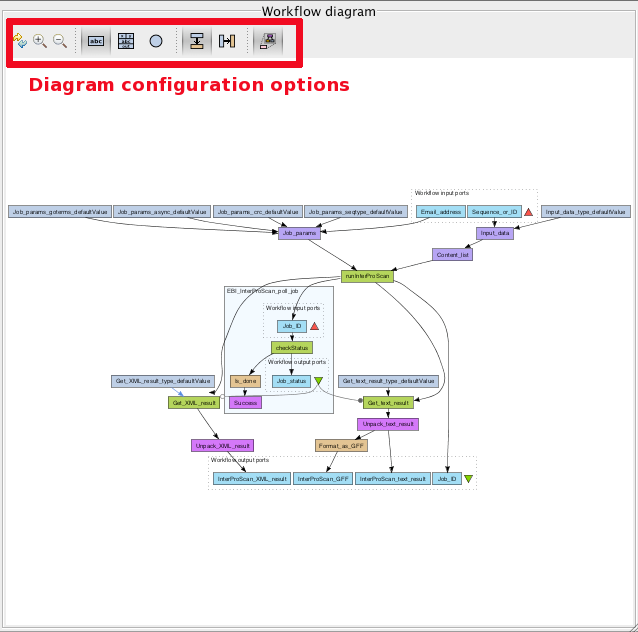
Workflow Diagram contains the workflow diagram image. It can be used to modify the workflow – by right-clicking the individual workflow items or on the white canvas a pop-up menu will appear with the available editing options.
Workflow Diagram has several options for configuring the layout and display of the diagram: top to bottom orientation, left to right orientation, zooming in and out, showing all service ports or service as a black box, etc.
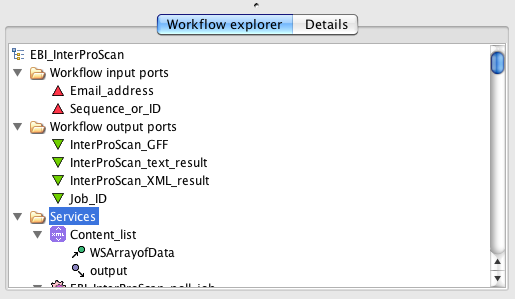
Workflow Explorer
Workflow Explorer, in the botton left corner of the Workbench, contains the hierarchical tree view of the current workflow. Similar to the Workflow Diagram, it can be used for editing the worklfow by right-clicking the workflow nodes in the tree.
In addition to the workflow tree tab, the Workflow Explorer panel also contains the Details View tab. This tab contains context-sensitive details of the currently selected workflow item (i.e. tree node).
XPath
XPath is a major path in W3C’s XSLT (Extensible Stylesheet Language Transformations) standard. It is used to navigate through elements and attributes in an XML document.
Quite often services used from Taverna return data in the form of XML. Normally you would only need a portion of that XML in order to feed it to the next service in your workflow. The XPath service provides enhanced support for creating and executing XPath expressions over XML data in order to extract specific fragments (elements or attributes) from the XML data.